Article · Digital Marketing Summit 2025, Seoul · April 2025
Think Page Discoverability, Not Internal Linking
From my DMS 2025 talk in Seoul: why I reframe internal linking as page discoverability, and how to build a discoverability matrix for SaaS sites.
By Sebastien Edgar · 3 min read
This is part three of the insights from my presentations at the Digital Marketing Summit 2025 in Seoul: improving page and product discoverability by creating a clear, actionable internal linking matrix, tailored for SaaS sites.
Why “page discoverability” instead of internal linking?
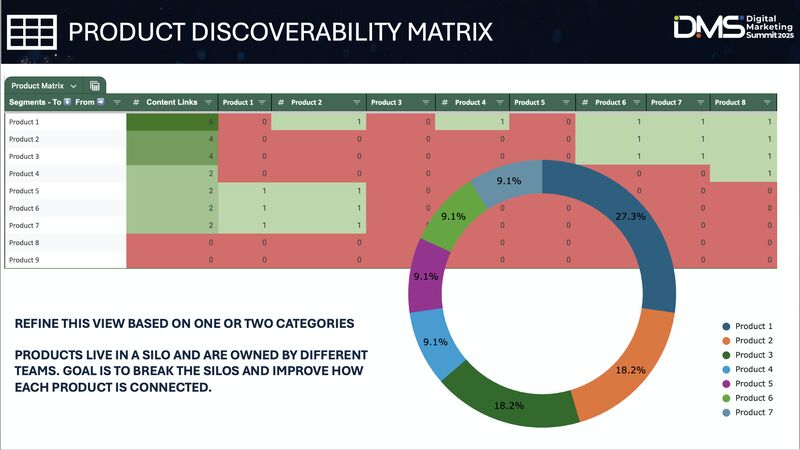
Internal linking is a tactic; page discoverability is the strategy and the outcome. The effort might simply be to improve the number of links Product A receives, but the end goal is to make Product A more discoverable, especially within the body content (we know from the “reasonable surfer” model how important body links are).
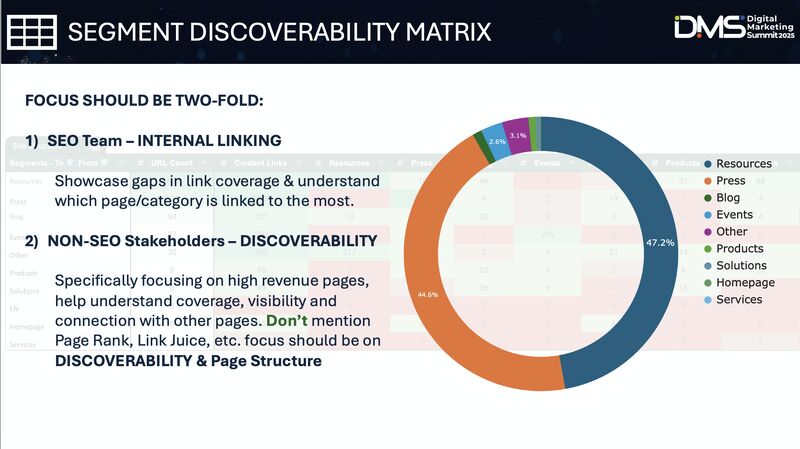
Internal linking may also not resonate with non-SEO stakeholders. It doesn’t clearly convey the issue or the end goal. Framing the conversation around discoverability shifts the narrative from “we need more links” to “we need to improve how discoverable this page is with X and Y initiatives” – one of them being internal linking.
Internal linking is a tactic. Page discoverability is the strategy and the outcome.
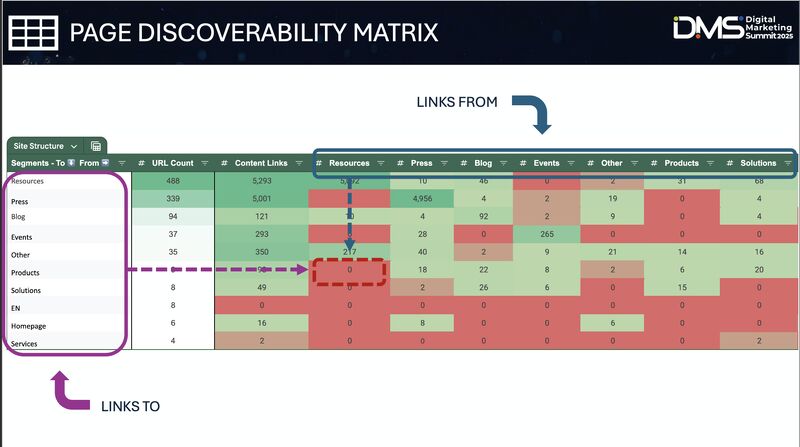
Creating a project name can also boost buy-in by elevating the initiative and making it strategic, which encourages stakeholder involvement. For example, I used a matrix to visualize the percentage of links from each product vs. other directories, showing how connected and visible pages were within body content – and named it “Project Cousteau.”
You can also compare the ratio of links to clicks (or revenue), and indexable to non-indexable pages, to see if any linking imbalance exists. For example: 34% of links go to directory X, but it only contributes 6% of clicks (or 2% of revenue).
Building the page discoverability matrix
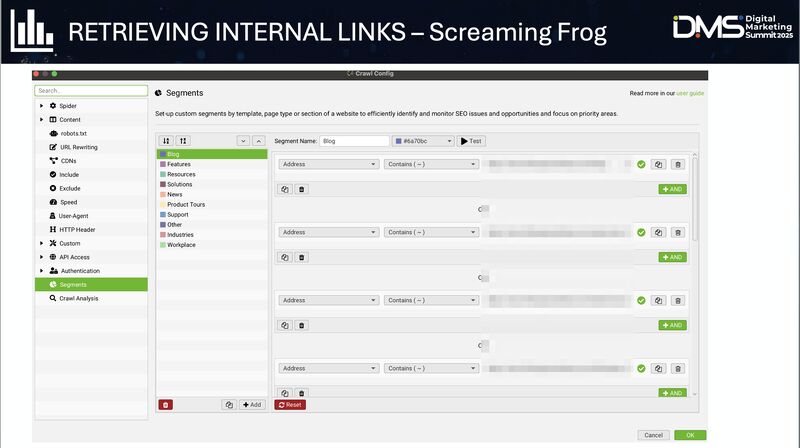
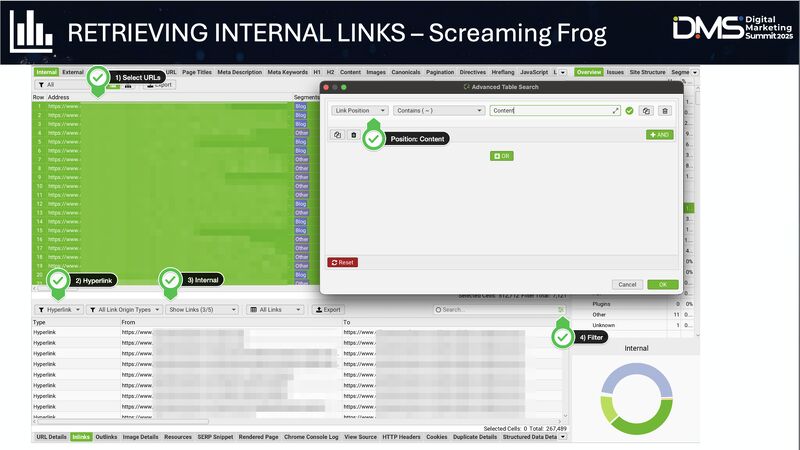
- Crawl the site using Screaming Frog (or any other tool that segments header, body content and footer links).
- Segment your website properly.
- Select your URLs.
- Filter to only hyperlinks, internal, non-self-referencing and content links.
- From the inlinks tab, select and export all body content links.
For a recent client (example above), we could clearly see the resources directory had the most URLs on the site, yet zero links to its product pages.
Next up: my favorite internal linking strategy.
More articles
Panel · October 2026
Building B2B Trust in Japan and Korea: Where Content Ends and People Begin
Notes from my panel with Li Yong (Nuvei) on why global playbooks break in Japan, why Korea moves faster online, and where content should hand over to people.
Read article (8 minute read)
Panel · 2025
SEO in the Era of AI and Reduced Clicks: What’s Actually Working
From my Ahrefs Evolve panel: modular content, HTML tables, why your comparison pages get ignored by AI Overviews, and why CRO matters more than ever.
Read article (11 minute read)
Podcast · 2026
AI and Trust Are Not Competing Priorities
Podcast notes on responsible AI: monitoring drift and cost, data infrastructure, new job metrics, provenance, AEO budgets and why trust is what lets AI scale.
Read article (10 minute read)
Article · April 2026
How We Grew AI Overview Visibility From 5% to 32%
Insights from my DMS 2026 presentation: how footer, header and homepage links plus refreshed guides moved AI Overview visibility and average position at Liferay – and why ChatGPT didn’t budge.
Read article (3 minute read)
Article · January 2026
How We Grew Homepage Conversions by 79%
A simple homepage hero test at Liferay: new CTAs, a motion graphic and localized partner logos lifted CTA clicks globally – but not in every market.
Read article (3 minute read)
Article · May 2025
JavaScript Rendering for LLMs: Why Isomorphic Rendering Matters
LLM crawlers don’t render JavaScript (aside from Gemini, which uses Googlebot). Why full client-side rendering is a problem and how Next.js and Nuxt solve it.
Read article (3 minute read)
Article · May 2025
Why Your Average Position Is Misleading (and the Formula I Use Instead)
The “average position” in Google Search Console and most tools is unweighted. Here’s why that matters, and my Excel formula for a weighted average by topic.
Read article (3 minute read)
Article · May 2025
Getting Your Brand Mentioned by LLMs Starts With Association
LLMs predict the next word based on patterns in their training data. What that means for your brand, and what the temperature parameter tells us about it.
Read article (3 minute read)
Article · April 2025
Help Centers: The Most Overlooked Source of Internal Links
In my study of top SaaS brands, support pages supplied only 1.5% of internal links to conversion pages – despite having as many pages as blogs or resources.
Read article (3 minute read)
Article · April 2025
Hreflang Tags and Global Content Sequencing
Hreflang tags don’t just show the right page to the right market – they pass authority. What that means when you grow content across markets.
Read article (3 minute read)